← All servicesAutomate & Apply AI
Ground the answer. Control the action.

Applied AI, Agents & Knowledge Systems

Build AI that works with your knowledge, uses tools within defined limits and supports decisions people can verify.

Two women reviewing programming code together on a laptop.

An answer is only useful if you can trust its basis

An assistant may sound convincing while using an outdated source or attempting an action it should not take. We design knowledge access, model choice and agent behaviour together, with evidence and approval boundaries.

Core service capabilities

Automation, Applications & Applied AI

Enterprise Knowledge Graphs

Build organisation-owned systems connecting entities, relationships and source evidence, with access and update ownership.

RAG, CAG & Microsoft Foundry

Build retrieval and agent services on Microsoft Foundry (formerly Azure AI Foundry). Compare query-time retrieval with prepared, cached contexts, and test permissions, freshness and model support before choosing either or combining them.

Copilot Studio Agents & Multi-Agent Orchestration

Build custom agents in Copilot Studio for Microsoft 365 Copilot and Teams. Give each agent scoped tools and knowledge, explicit hand-offs and human approval before consequential actions.

Frontier & Local Model Deployment

Use Microsoft Foundry model options, route demanding tasks to frontier models and assess smaller or local deployments for cost, latency and privacy.

AI Readiness & Governance

Assess use cases and data suitability; evaluate grounding, failure handling, cost and latency, then monitor behaviour.

Knowledge-to-action path

Scope the decision and permitted sources, test grounding and failure behaviour, then agree human review and operating ownership.

Process → Architecture → Delivery

Our methodology

  1. 01DiscoverAgree the outcome, the decisions and the requirements.
  2. 02Current stateMap how the work and data flow today, with evidence.
  3. 03Root causesFind what drives the delay, rework or disagreeing numbers.
  4. 04ApproachAgree the target design, scope and measures of success.
  5. 05BuildBuild the agent or AI service, grounded in governed data.
  6. 06OptimiseTest at real volumes; tune speed, cost and usability.
  7. 07ProductioniseRelease with managed deployment, monitoring and support.
  8. 08GovernSet owners, access and controls so it keeps working.
Swimlane process map: To-be: answer with evidence or abstain; act only with approval. The steps are listed below the diagram.
Process redesignTo-be: answer with evidence or abstain; act only with approval Access and freshness are checked before retrieval. With no permitted, current evidence the assistant abstains, and proposed actions wait for an authorised person.
Steps in this diagram

Lanes: User, Assistant / agent, Knowledge owner, Authorised approver.

  • Question
  • Check identity + source permissions
  • Retrieve / reuse context (freshness)
  • Supported?
  • Abstain + say what is missing
  • Answer with citations
  • Fix stale / missing source
  • Action proposed?
  • Approve consequential action
  • Run tool, log result
  • Done
Architecture diagram: Knowledge system: identity first, graph + retrieval + cached context, scoped agents. The components are listed below the diagram.
Reference architectureKnowledge system: identity first, graph + retrieval + cached context, scoped agents Start with user identity and source permissions. The graph links supplier, policy, contract, owner and source; RAG retrieves permitted evidence at query time; CAG reuses prepared context after freshness checks. Consequential actions need separate permission and human approval. Foundry is a model-platform option, not a provider claim.
Components in this design
  • User (Teams / web)
  • Entra ID (identity + groups)
  • Copilot Studio (conversational agent)
  • Foundry Agent Service (scoped tools)
  • Knowledge graph (Fabric graph / ontology)
  • Azure AI Search (RAG, security trimming)
  • Prepared context (CAG, freshness check)
  • Foundry Models (frontier + small)
  • Foundry Local (private / on-device)
  • Approval flow (human before action)
  • Business systems (ERP, contracts)
  • Tracing + evals (feeds the sample report)
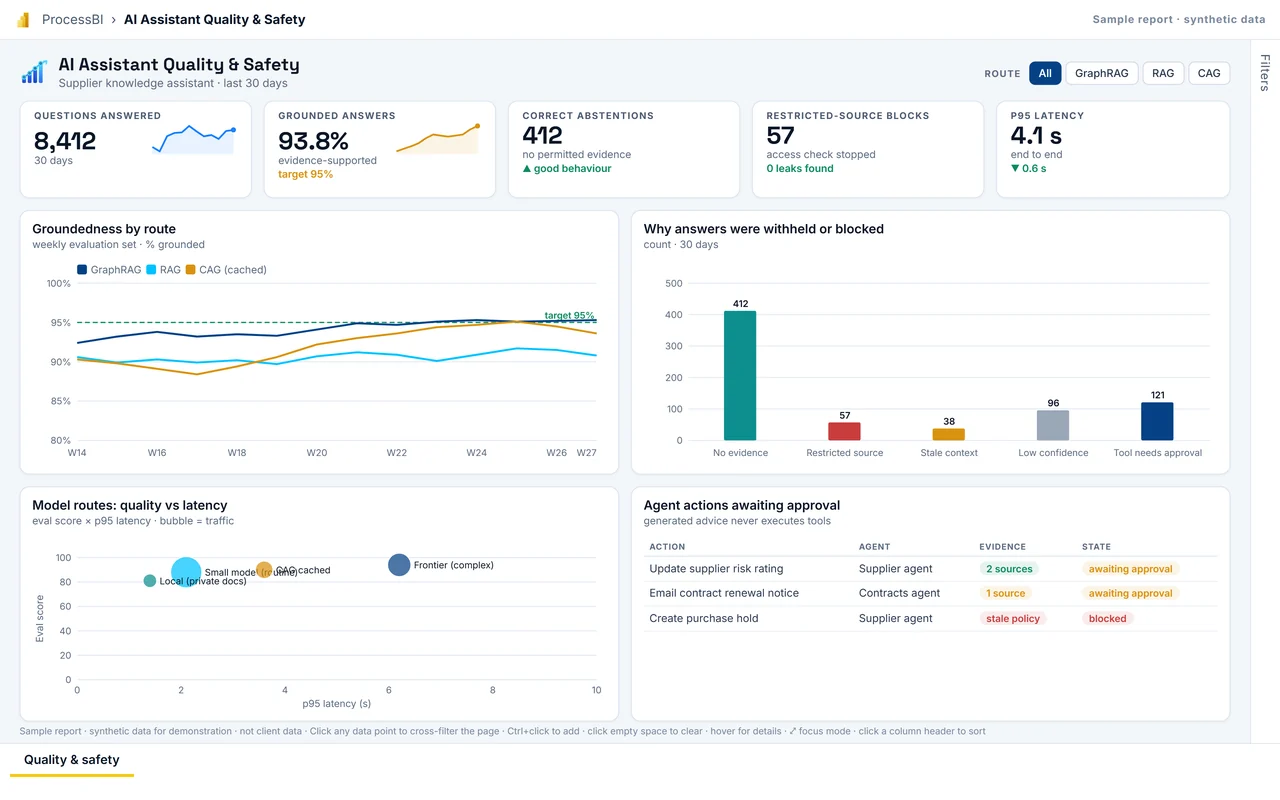
First page of the AI Assistant Quality & Safety sample report
Delivery: interactive Power BI sample reportAI Assistant Quality & Safety Evaluate assistant answers and agent actions continuously: grounded answers, correct abstentions, blocked restricted sources, stale-context invalidations, latency and model mix. Delivered with named owners, role-based access, release pipelines and a controlled way to change governed measures.
Full screen
Who it is for
AI product owner, knowledge owners, risk & security.
Decision it supports
Which sources or prompts to fix, which model route to use per task, whether an agent may gain a tool.
Report pages
Quality & safety

Microsoft icons are used under Microsoft's terms. Icon notices

Synthetic sample data. Click any bar, point or row to cross-filter; use the tabs at the bottom to change page.

Next step

Want AI answers your team can check and trust?

Tell us what is happening. We agree priorities and scope before proposing any work.