← All servicesAutomate & Apply AI
Give every case an owner, a next action and a finish.

Business Applications & Digital Workflows

Replace disconnected spreadsheets and inboxes with applications that guide work from capture through to completion.

A woman using a digital tablet beside her laptop at a work desk.

Another form will not fix an invisible queue

A form captures the request, but the team still tracks ownership, approvals and progress elsewhere. We build process-focused applications that bring the record, next action and status together, connected to the systems underneath.

Core service capabilities

Automation, Applications & Applied AI

Operational Applications

Design case handling, task queues, guided capture, approvals and exception management around the work people perform.

Power Apps & Custom Front Ends

Choose the interface approach around users, access needs and integration requirements—not a predetermined platform.

Azure Application Integration

Use Azure App Service, Azure Functions and APIs where appropriate, with explicit identity and data-access boundaries.

Usable & Supportable Delivery

Include role-based views, validation, accessibility checks, testing and a handover that explains how the application is supported.

Try the sample task queue

Deliver the user journey, usable screens, validation and access rules, acceptance tests and support handover. Confirm that the case state, next action and underlying record agree.

Process → Architecture → Delivery

Our methodology

  1. 01DiscoverAgree the outcome, the decisions and the requirements.
  2. 02Current stateMap how the work and data flow today, with evidence.
  3. 03Root causesFind what drives the delay, rework or disagreeing numbers.
  4. 04ApproachAgree the target design, scope and measures of success.
  5. 05BuildBuild the workflow, app or automation, with exception paths.
  6. 06OptimiseTest at real volumes; tune speed, cost and usability.
  7. 07ProductioniseRelease with managed deployment, monitoring and support.
  8. 08GovernSet owners, access and controls so it keeps working.
Swimlane process map: As-is vs to-be: supplier bank-detail change (CASE-041). The steps are listed below the diagram.
Process redesignAs-is vs to-be: supplier bank-detail change (CASE-041) To-be: the case is captured once, owned, verified by call-back before completion, and the ERP update is confirmed. Exceptions stay owned.
Steps in this diagram

Lanes: Supplier, Operations (app), AP manager, ERP (automated).

  • Change requested
  • Capture case + owner
  • Verify by call-back (known number)
  • Verified?
  • Escalate exception (owned)
  • Update vendor master
  • Read back + confirm
  • Complete case
  • Supplier notified
Architecture diagram: Application reference architecture. The components are listed below the diagram.
Reference architectureApplication reference architecture The interface displays the work, business rules enforce validation and permissions, and governed records keep roles and an audit trail. Power Apps or a custom front end are interchangeable choices; App Service is a hosting option, not a default.
Components in this design
  • Case workers (role-based views)
  • Suppliers (external portal)
  • Power Apps (model-driven / canvas)
  • Custom front end (App Service)
  • Power Pages (external capture)
  • Business rules (status, permissions)
  • Azure Functions (integration APIs)
  • Dataverse (cases, audit trail)
  • Azure SQL (alternative store)
  • ERP / finance (source systems)
  • Automations (notifications, sync)
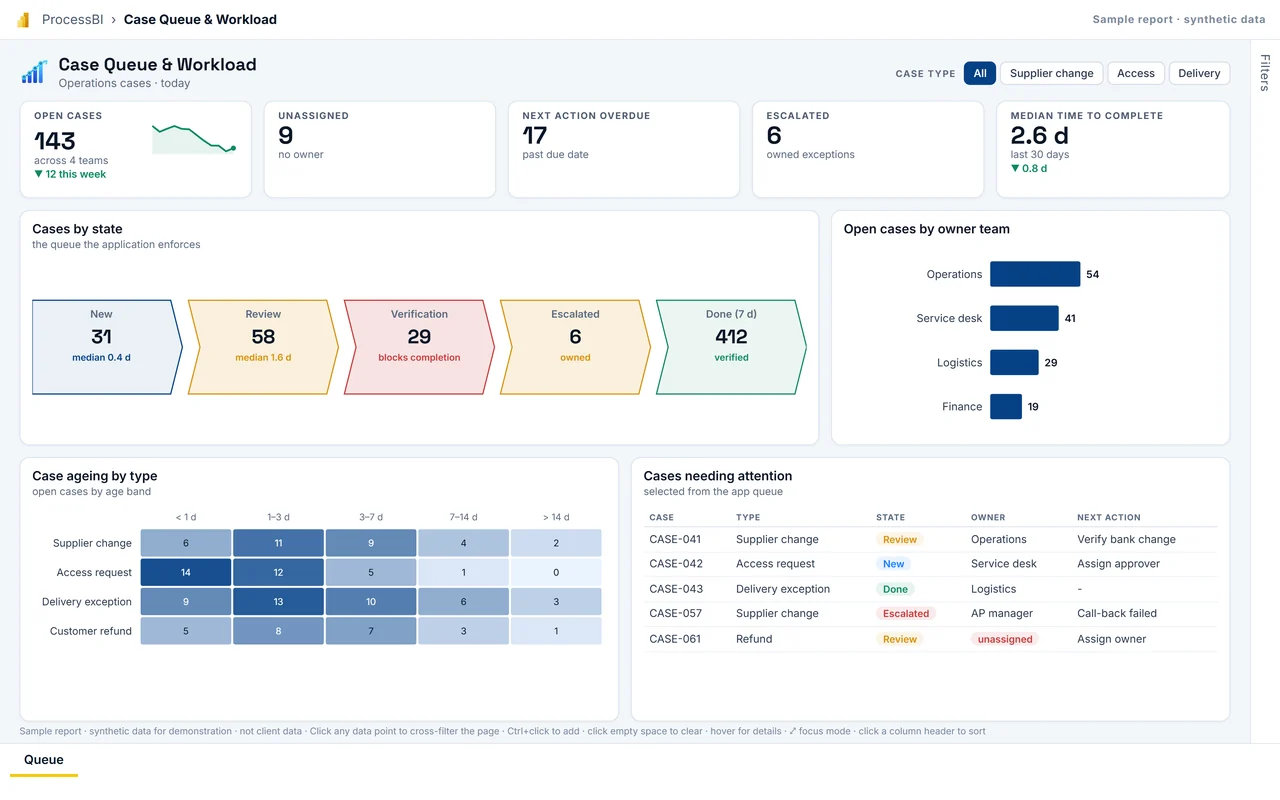
  • Queue dashboard (sample report on this page)
First page of the Case Queue & Workload sample report
Delivery: interactive Power BI sample reportCase Queue & Workload Give team leads the queue view the application creates: what is waiting, with whom, for how long, and which verifications are blocking completion. Delivered with named owners, role-based access, release pipelines and a controlled way to change governed measures.
Full screen
Who it is for
Team leads, operations manager.
Decision it supports
Rebalance work, escalate aged cases, fix the verification step that blocks most completions.
Report pages
Queue

Microsoft icons are used under Microsoft's terms. Icon notices

Synthetic sample data. Click any bar, point or row to cross-filter; use the tabs at the bottom to change page.

Next step

Is a spreadsheet or inbox doing the job of an application?

Tell us what is happening. We agree priorities and scope before proposing any work.