← All servicesAutomate & Apply AI
Automate the hand-off. Keep failures recoverable.

Workflow Automation & Systems Integration

Connect systems and automate repeatable work, with validation, human approvals and a clear recovery path.

A developer typing on a laptop with programming code displayed on its screen.

The task finished in one system—and stopped there

Someone copies the result into another application, then chases an approval. We redesign these hand-offs and automate the repeatable steps, including what happens when information is missing or a system is unavailable.

Core service capabilities

Automation, Applications & Applied AI

Power Automate & Workflow Automation

Use cloud flows or desktop RPA where the process rules and system constraints justify them.

Integration & Orchestration

Connect APIs, events and scheduled jobs using n8n, Windmill or the tools that fit the environment.

Custom Automation

Use Python, PowerShell and C# for processing and integration logic that needs more control than a visual workflow provides.

Operational Safeguards

Handle validation, duplicate events, retries and logs, with a named person for escalation and recovery.

Try an exception, not only the happy path

An action request is not a confirmed business result. Define validation, approval, confirmation and owned recovery together; test duplicate events and uncertain receipts before handover.

Process → Architecture → Delivery

Our methodology

  1. 01DiscoverAgree the outcome, the decisions and the requirements.
  2. 02Current stateMap how the work and data flow today, with evidence.
  3. 03Root causesFind what drives the delay, rework or disagreeing numbers.
  4. 04ApproachAgree the target design, scope and measures of success.
  5. 05BuildBuild the workflow, app or automation, with exception paths.
  6. 06OptimiseTest at real volumes; tune speed, cost and usability.
  7. 07ProductioniseRelease with managed deployment, monitoring and support.
  8. 08GovernSet owners, access and controls so it keeps working.
Swimlane process map: As-is: purchase request PR-204 (manual hand-offs). The steps are listed below the diagram.
Process redesign 1 of 3As-is: purchase request PR-204 (manual hand-offs) The request is re-keyed into the ERP, the approval is chased by email, and nobody confirms that the PO update actually happened.
Steps in this diagram

Lanes: Requester, Procurement officer, Approver, ERP.

  • Need
  • Email spreadsheet request
  • Check fields by eye
  • Chase approval by email
  • Approve in email
  • Re-key into ERP
  • PO created?
  • Requester asks
Swimlane process map: To-be: PR-204 validated, approved, attempted and confirmed. The steps are listed below the diagram.
Process redesign 2 of 3To-be: PR-204 validated, approved, attempted and confirmed Validate required fields and check for duplicate events, then ask an authorised approver. Approval records one attempted action; only a checked receipt confirms completion. An uncertain receipt goes to Operations for reconciliation before any retry.
Steps in this diagram

Lanes: Request owner, Automation, Approver, Operations.

  • PR-204 submitted
  • Validate fields + duplicate check
  • Valid?
  • Correct missing field
  • Approve / reject
  • Rejected: no action
  • Attempt ERP update (one attempt id)
  • Receipt?
  • Reconcile before any retry
  • Confirm completion
  • Requester notified
Automation opportunity map: Automation opportunity map: procure-to-pay hand-offs. The steps are listed below the diagram.
Process redesign 3 of 3Automation opportunity map: procure-to-pay hand-offs Rules-based steps with clear data are automated first. Interpretation steps (invoice capture, exception triage) use AI with human review; disputes stay with people.
Steps in this diagram
  • Field validation
  • Duplicate check
  • Approval routing
  • PO update in ERP
  • Legacy vendor portal
  • Invoice data capture
  • Exception triage
  • Supplier dispute
  • Spend reporting
Architecture diagram: Integration architecture with validation, approval and owned recovery. The components are listed below the diagram.
Reference architectureIntegration architecture with validation, approval and owned recovery A message queue decouples request capture from the target system. Every action carries an idempotency key, and receipts are checked explicitly. Uncertain outcomes go to a reconciliation queue with a named owner before any retry.
Components in this design
  • Request app (PR capture)
  • Email intake (parsed request)
  • Validation flow (fields, budget code)
  • Approver (Teams adaptive card)
  • Service Bus (idempotency key)
  • Logic Apps (ERP connector)
  • Desktop RPA (legacy app, no API)
  • Function (custom logic (C#/Python))
  • Target system (ERP / finance)
  • Receipt check (read-back, not 200 OK)
  • Recovery queue (named owner)
  • App Insights (run logs, traces)
  • Ops dashboard (sample report on this page)
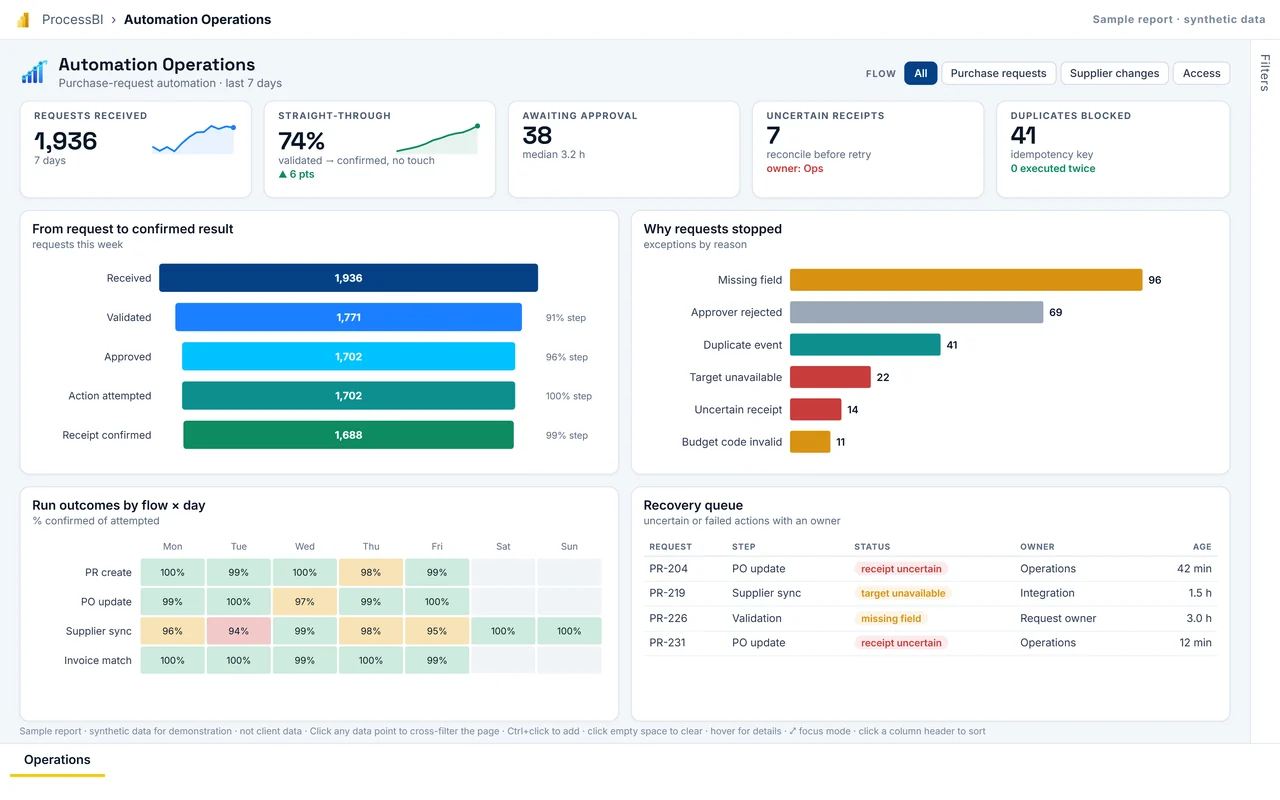
First page of the Automation Operations sample report
Delivery: interactive Power BI sample reportAutomation Operations Show how much work flows straight through, where it stops, and which attempted actions still need confirmation or recovery. Delivered with named owners, role-based access, release pipelines and a controlled way to change governed measures.
Full screen
Who it is for
Automation CoE, process owners, operations on-call.
Decision it supports
Which exception class to fix in the flow design; who recovers today's uncertain receipts.
Report pages
Operations

Microsoft icons are used under Microsoft's terms. Icon notices

Synthetic sample data. Click any bar, point or row to cross-filter; use the tabs at the bottom to change page.

Next step

Does work finish in one system and stall in the next?

Tell us what is happening. We agree priorities and scope before proposing any work.