Automation is appealing because it looks like a direct route from repetitive work to saved time. In practice, the hard part is not connecting systems. It is deciding which version of the process deserves to be made faster and repeatable.
ProcessBI treats automation as the implementation of a designed operating process. We map the work, isolate avoidable waiting and rework, define exceptions and controls, then select technology. This often produces a smaller and more dependable automation than the original request.
The automation readiness test
The purpose is clear. Name the customer or operator outcome, not just the manual task to remove. “Send reminders automatically” is a feature; “reduce unresolved requests without losing escalation control” is an operating objective.
The process is visible. Document the real current flow, including spreadsheets, inboxes, queues, workarounds and hand-offs. If different operators follow different paths, the differences need explanation before they become code.
The rules are stable enough. Repeated, explicit decisions suit workflow automation. Context-heavy decisions may need human review or carefully bounded AI assistance. A process being redesigned every month is a poor target for rigid automation.
Exceptions are understood. Count and classify failed, incomplete and unusual cases. The happy path is rarely the expensive part of a production automation; unattended exceptions are.
Inputs are usable. Check whether required data is structured, available at the right time and permitted for the intended use. Email, PDFs and desktop-only legacy systems may be workable, but they change the controls and maintenance burden.
Value is measurable. Baseline volume, active effort, elapsed time, error or rework, backlog and control risk. Use observed ranges rather than a promised saving percentage.
Ownership continues after launch. Name the process owner, technical owner and exception owner. Define monitoring, change approval, credential management and the manual fallback.
Redesign before you encode
Suppose a request is checked by three teams because information is often missing. Automating the three hand-offs preserves the queue. Redesign may instead validate required information at intake, assign one accountable owner and route only genuine exceptions for review.
The distinction matters: automation should remove avoidable work, not make it travel faster between the same unresolved boundaries.
Choose technology after the operating pattern
- Workflow and integration: Power Automate or Logic Apps can suit event-driven approvals, notifications and system orchestration.
- Desktop automation: Power Automate Desktop can bridge a legacy interface when no suitable API exists, with explicit monitoring for UI changes.
- Business applications: Power Apps or a purpose-built application can provide controlled intake, case management and status visibility.
- AI-assisted work: models or agents can classify, summarise or propose next actions when outputs are bounded, evaluated and reviewable.
- Code-first services: APIs and Python services can suit complex rules, higher-volume processing or integration that needs engineering control.
These patterns can coexist. The architecture should follow the process boundaries, data sensitivity, failure modes and support capability—not a preference for one tool.
What a responsible pilot proves
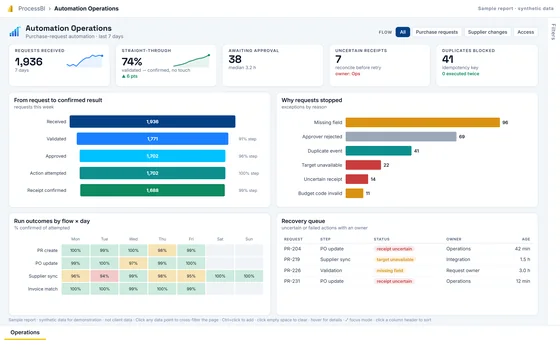
A pilot should run on representative cases and demonstrate more than a successful screen recording. It should prove that the trigger is reliable, permissions are least-privilege, decisions are traceable, duplicate processing is controlled, exceptions reach an owner and the team can restore service or use a fallback.
Compare the pilot with the baseline. If cycle time improves but exceptions or manual follow-up increase, the automation has shifted work rather than removed it.
Where AI agents fit
Agents are useful when work requires several bounded steps, access to defined tools and context that changes from case to case. They should not be used to hide an undefined process. Give each agent a clear role, constrained permissions, observable actions and a human review gate for material decisions.
Our project management with AI agents demonstration shows that principle visually: agents progress assigned work while human review remains an explicit stage.
See ProcessBI’s Workflow Automation & Systems Integration service and process improvement approach. If you have a specific workflow in mind, book a discovery conversation and bring the current process, not just the preferred tool.